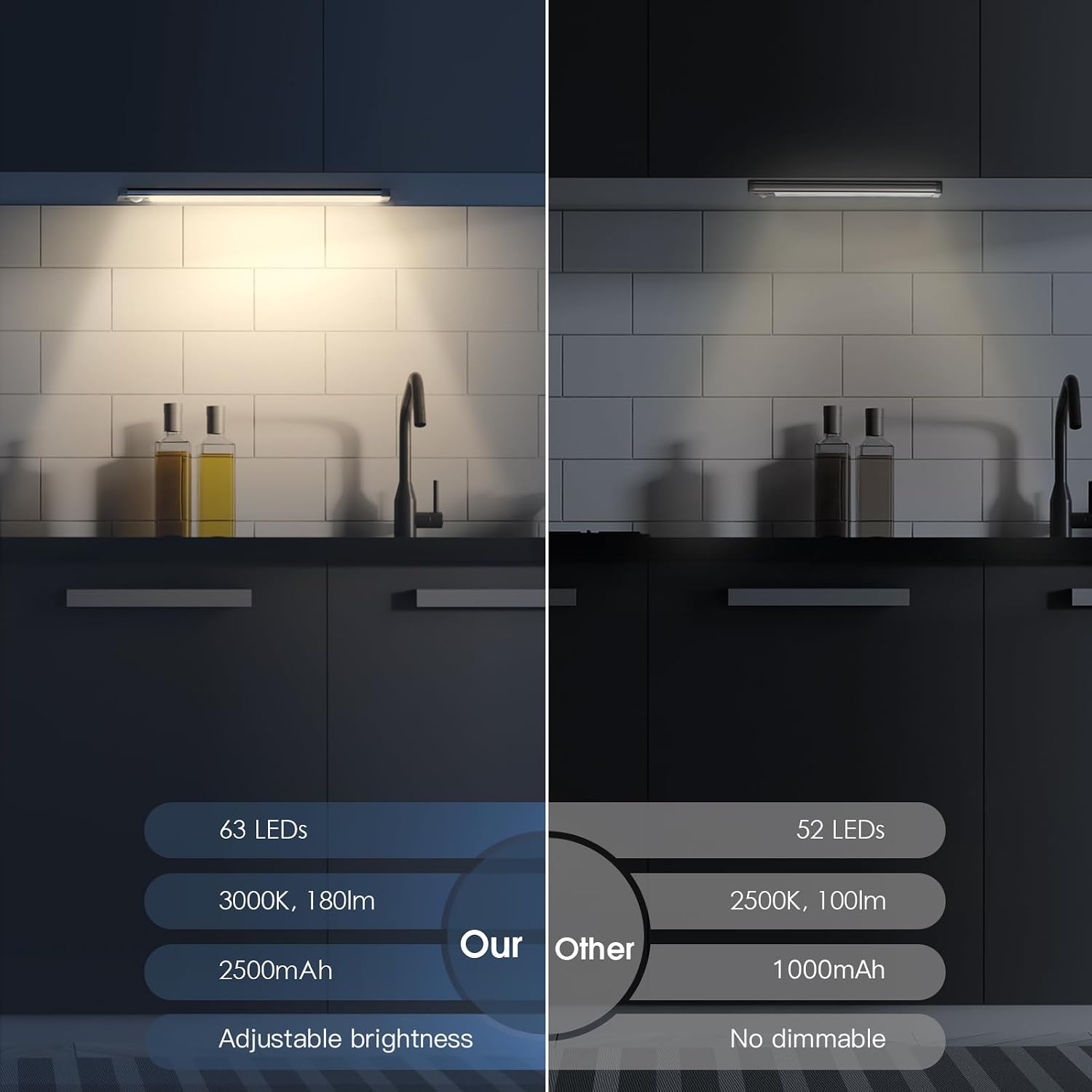
Rechargeable Under-Cabinet Lights with Motion Sensors: A Real-Use Spec Comparison
If you’ve ever fumbled for a light switch while carrying a cutting board in both hands, you already understand the appeal of under-cabinet lighting that turns on by itself. Rechargeable motion-sensor under-cabinet lights — battery-powered strips that attach magnetically beneath your upper cabinets and wake up the moment you step into range — have moved from novelty to mainstream kitchen upgrade over the past few years. No electrician, no permit, no wire fishing. You stick them up, charge them like a phone, and they respond to your presence automatically. For renters, house-flippers prepping a kitchen for resale, or anyone adding a kitchen to a remodel without touching the electrical plan, they solve a real problem at a low price point.
What the listings don’t tell you is where these lights differ from each other in ways that matter across a full kitchen install — battery runtime in motion-sensor mode versus always-on mode, how the adhesive holds over months of heat and humidity, whether a 10-inch bar covers a 36-inch cabinet run, and how you manage recharging when you have six units installed and one dying mid-week. We read through the published specifications and aggregated hundreds of owner reviews across Houzz, consumer review platforms, and editorial roundups from This Old House, Apartment Therapy, and Wirecutter to build this comparison. Here’s the honest picture.
| EDITOR'S PICK[EZVALO 6-Pack Under Cabinet Lig…](https://www.amazon.com/dp/B0GH7885ZY?tag=greenflower20-20) | Mid-tier[MCGOR 14.7inch Under Cabinet Li…](https://www.amazon.com/dp/B0GL2M1PLM?tag=greenflower20-20) | Budget pick[MCGOR 10inch Under Cabinet Ligh…](https://www.amazon.com/dp/B0BDF8CVBN?tag=greenflower20-20) | |
|---|---|---|---|
| Battery capacity | 2000mAh | — | — |
| Color temps | 3 | — | — |
| Timer | ✓ | — | — |
| Remote control | ✓ | — | — |
| Length | — | 14.7" | 10" |
| Price | $39.99 | $23.74 | $15.94 |
| See on Amazon → | See on Amazon → | See on Amazon → |
The Motion Sensor Is the Point — But It Costs You Battery Life
Owners across dozens of aggregated Houzz and consumer review threads are consistent on one thing: the automatic-on motion sensor is the feature that converts skeptics. Phrases like “lights just come on as I walk by” and “I wish I’d gotten these sooner” repeat with enough frequency that they clearly represent genuine experience, not outliers. The sensor-activation experience — no reaching, no switch, no voice command — lands differently than any spec sheet can communicate.
But here’s the tradeoff the product listings consistently understate: running in motion-sensor mode drains the battery measurably faster than always-on mode at the same brightness level. That seems counterintuitive — motion-sensor mode turns the light off when you’re not present, so shouldn’t it use less power? The answer lies in the PIR sensor circuit (PIR stands for passive infrared — the small detector that reads body heat movement to trigger the light). That sensor draws a small but continuous current to stay alert, and it activates a full-brightness burst each time it fires rather than ramping up gradually. Owners in long-run reviews note runtimes in motion-sensor mode running roughly 30–50% shorter than the “up to 50 days” figures cited in always-on low-brightness specs. Manufacturer specs typically cite runtime at minimum brightness, continuous — not at the mid-to-high brightness setting most owners actually use, and not accounting for frequent sensor activations in a busy kitchen. The runtime gap isn’t a defect; it’s physics. But it does affect your recharge planning, especially across a full kitchen build-out.
By the numbers — what published specs say vs. what owners report:
| Mode | Manufacturer-rated runtime | Owner-reported runtime (active kitchen) |
|---|---|---|
| Always-on, low brightness | Up to 50 days | 30–45 days |
| Always-on, high brightness | 6–10 days | 5–8 days |
| Motion-sensor, mid brightness | Not typically specified | 10–20 days |
This table draws from aggregated owner reporting across review platforms and published spec sheets for MCGOR and EZVALO product lines — not from our own testing. Your mileage will vary based on kitchen traffic, sensitivity settings, and brightness level selected.
MCGOR vs. EZVALO: Where the Specs Actually Diverge
Both MCGOR and EZVALO represent the current generation of rechargeable magnetic-mount under-cabinet lights, and both have earned enough real-world reviews to make meaningful comparisons possible. Here’s where the published specs and owner patterns separate them.
MCGOR reviewers consistently highlight build consistency and a straightforward two-mode operation (motion-sensor and always-on). The magnetic mount design — a steel backing plate adheres to the cabinet surface, the light snaps onto it — is praised universally across both brands, but MCGOR owners specifically flag the mount strength as confidence-inspiring even after months of use. This Old House’s editorial roundup on under-cabinet lighting notes magnetic-release charging as a design win for this product category broadly, and owner reviews echo that finding.
EZVALO, particularly the 6-pack bundle with centralized charging station, solves a problem that MCGOR’s per-unit USB charging approach leaves open: how do you manage recharging six or more lights without it becoming a weekly logistics headache? The centralized dock lets you pull all units, drop them into the station overnight, and reinstall in the morning. Owners with full kitchen installs — typically five to eight lights covering a standard kitchen perimeter — consistently call out this feature as worth the slight price premium over buying individual units. If you’re spec-ing a kitchen with six or more runs, the charging station isn’t a luxury; it’s an operational feature that affects whether the lights actually stay charged in practice.
EZVALO also introduced a warm-to-white color temperature toggle on some SKUs (CCT switching — color-correlated temperature, which is the warmth or coolness of white light measured in Kelvin). One reviewer explicitly notes this as “essential” — warm white (around 2700–3000K) for evening ambiance and cooking atmosphere, cooler white (4000–5000K) for task lighting when you need to see if chicken is actually cooked through. Wirecutter’s under-cabinet lighting guide notes color temperature switching as an increasingly common differentiator in this category, and the owner reviews suggest it reads as a real functional difference rather than a marketing feature.
Size, Coverage, and the Gap Problem
The two most common bar lengths in this category — 10-inch and 14.7-inch — matter more than they look in a listing photo.
A standard upper cabinet run is 30, 36, or 42 inches wide. A single 10-inch bar covers roughly the center zone beneath that cabinet, leaving the corners noticeably dimmer. For a 36-inch cabinet, that means about 13 inches of shadow on each side of a centered 10-inch light. In practice, this is fine if your task work (chopping, prep) happens at the center of the counter, but owners doing close-margin cutting at counter edges report noticing the falloff.
The 14.7-inch bar closes roughly a third of that gap on a 36-inch cabinet, leaving about 10.6 inches unlit on each side — a meaningful improvement for counters where you work across the full width. For 30-inch cabinets, the 14.7-inch bar covers nearly half the span and owners report feeling the improvement as genuine rather than marginal.
The practical decision rule: if you’re spec-ing a rental property or a flip where buyers will evaluate the lighting impression during a showing, use 14.7-inch bars. The more even wash reads better visually even to someone who can’t articulate why. For a primary kitchen where you’re doing real cooking, use the longer bar wherever your prep zone sits, and accept the shorter format in secondary locations like above the microwave or a pantry shelf.
Speaking of non-kitchen installs: reviewers using these in RVs, closets, gun safes, and pantry shelves consistently report they over-deliver in those contexts. The sensor range and battery runtime that feel marginal in a busy kitchen are more than adequate in a space accessed five times a day rather than fifty. If you’re spec-ing a property with a butler’s pantry, a laundry room with under-shelf storage, or a mudroom locker system, these lights are worth considering across all those applications — not just the kitchen.
The Adhesive Question: Will It Stay Up?
The magnetic mount system works in two parts: a steel backing plate (usually double-sided adhesive or screw-mount) stays on the cabinet, and the light snaps to it. The long-term durability question is really about the adhesive plate, not the magnet.
Owner reports split predictably by surface. On painted cabinet undersides with a clean, smooth finish (typical of factory-finished cabinetry from Fabuwood, Dura Supreme, or comparable semi-custom lines), the adhesive plates hold reliably across 12+ months per long-run reviews on Houzz. On textured, rough, or slightly oily surfaces — common in older cabinets, site-painted cabinetry, or natural wood without a topcoat — failure rates increase noticeably, with some owners reporting drops after 3–6 months.
The fix is straightforward: clean the surface with isopropyl alcohol before mounting, allow full cure time (24–48 hours before loading the magnet), and optionally add a supplementary screw through the backing plate’s pre-drilled hole if it’s available on the model. Apartment Therapy’s overview of adhesive-mount lighting notes this prep sequence as the single most reliable predictor of long-term adhesive success across product categories — the adhesive itself is rarely the failure point; surface prep is.
Can You Use These in a Rental Without Damaging Cabinets?
This is one of the most common practical questions, and the answer is genuinely yes — with one caveat. The adhesive backing plates are designed for removal, and most owners report clean removal after 12–24 months with no finish damage on factory-painted or thermofoil cabinets. The risk surface is older painted wood where the paint is already chalky or poorly bonded; in those cases, removing any adhesive mount may pull paint regardless of product.
For a rental install, the safest approach is to use the screw-mount backing plate option if available (one small screw hole versus adhesive risk), or to use a temporary-bond adhesive pad (3M Command-style strips) instead of the included adhesive — owners in rental-specific review threads report this swap as reliable for the weight class of these lights. The lights themselves weigh roughly 4–6 ounces, well within the capacity of standard temporary-bond strips.
Frequently Asked Questions
How long does a full charge actually last in motion-sensor mode versus always-on mode? Based on aggregated owner reports in active kitchens: expect 10–20 days in motion-sensor mode at mid-brightness versus 30–45 days in always-on low-brightness mode. The PIR sensor circuit draws continuous standby current, and each activation fires a full-brightness burst. Manufacturer-rated runtimes typically describe low-brightness continuous mode — not the conditions most users actually run.
Will the adhesive magnetic mount stay stuck under cabinets long-term? On smooth, clean, factory-finished cabinet surfaces: yes, reliably through 12+ months per long-run owner reviews. Surface prep is the variable that matters most. Clean with isopropyl alcohol, allow 24–48 hours cure time before loading the unit, and optionally add a supplementary screw if the backing plate supports it.
What is the difference between the 10-inch and 14.7-inch versions in terms of real coverage? Under a standard 36-inch cabinet, a 10-inch bar leaves roughly 13 inches of shadow on each side; a 14.7-inch bar reduces that to about 10.6 inches. The 14.7-inch format noticeably improves light evenness across the full counter width, which matters most in prep-intensive kitchens and in properties where visual impression during a showing influences buyer perception.
Can I use these in a rental apartment without damaging cabinets? Generally yes — particularly on factory-painted or thermofoil surfaces. For extra safety, substitute temporary-bond adhesive strips for the included adhesive, or use the screw-mount option if available. Avoid installations on chalky or poorly bonded painted wood where any adhesive removal carries paint-pull risk.
How do I manage recharging when I have six or more lights installed across a kitchen? This is where the EZVALO 6-pack with centralized charging station earns its price premium. Individual USB charging across six or more units becomes a weekly logistics exercise — one unit always seems to be dying when you need it. The centralized dock lets you pull all units, charge overnight, and reinstall in one operation. For full kitchen installs of five or more lights, the charging station approach is the practical choice, not just a convenience feature.